Disclosure: I build TimedSubs, a subtitle timing tool, and the SRT scored here came from it. This post is about the test method. I used AI to help edit the text and fact-check it against the files. The fixture files are public, and the timing differences below can be recomputed from the recorded clip starts, the SRT and the joined MP3; the original clip assembly cannot be reconstructed from those files.
Checking subtitle timing by scrubbing a video and squinting is easy to do and easy to fool. A spot check can miss a cue that is a few tenths of a second early or late, and it gives you no number to compare between two tools or two versions of your own pipeline.
So I built a small test where the answer is known in advance, and scored the subtitles against it. It takes two passes: one with plain Python, one with a single ffmpeg command.
Step 1: Build audio where you know the answer
The trick is to make the ground truth part of how the audio is made.
I wrote a 141-word script in seven paragraphs, generated text-to-speech for one paragraph at a time, and joined the clips with a fixed 0.6-second gap. Because I placed each clip, I know where each one starts:
start of clip n = (sum of clip lengths before n) + 0.6 s × (n − 1)
I saved those starts in a JSON file with each paragraph's opening words, so they can be matched to subtitle lines later (excerpt):
[
  { "paragraph": 1, "starts_at_seconds": 0,     "first_words": "You have a finished script and a voiceov" },
  { "paragraph": 3, "starts_at_seconds": 20.5,  "first_words": "Then upload the matching voiceover. MP3," },
  { "paragraph": 5, "starts_at_seconds": 39.15, "first_words": "When it's ready, check the timeline. If " }
]
One honest gap: the repository has the joined 66-second MP3 and the JSON, but not the seven original clips. So the starts are my record of how I assembled the file, not something you can re-derive from the MP3 alone. If you build your own fixture, save the clip lengths too.
Step 2: Get an SRT from the tool you want to test
For this run I gave the tool the script and the MP3, and downloaded its SRT without editing it. It came back with 12 cues; the first two:
1
00:00:00,000 --> 00:00:03,000
You have a finished script and a voiceover.

2
00:00:03,600 --> 00:00:12,040
Here's how to turn them into an SRT subtitle file, without retyping or re-transcribing a single word.
Step 3: Score cue starts against the known clip starts
For each paragraph, find the cue whose text starts with that paragraph's opening words and compare its start time with the clip start. This adapts the repository script to require exactly one matching cue per paragraph, and to stop with a clear message when a match is missing or ambiguous instead of crashing on None.
import json, re

def parse_srt(path):
    cues = []
    for block in open(path, encoding="utf-8").read().strip().split("\n\n"):
        lines = block.splitlines()
        h, m, s, ms = map(int, re.match(r"(\d+):(\d+):(\d+),(\d+)", lines[1]).groups())
        cues.append((h * 3600 + m * 60 + s + ms / 1000, " ".join(lines[2:])))
    return cues

cues = parse_srt("output.srt")
worst = 0.0
for p in json.load(open("paragraph-starts.json")):
    prefix = p["first_words"][:20]
    matches = [c for c in cues if c[1].startswith(prefix)]
    if len(matches) != 1:
        raise SystemExit(f"paragraph {p['paragraph']}: expected 1 cue starting with {prefix!r}, found {len(matches)}")
    start = matches[0][0]
    diff = start - p["starts_at_seconds"]
    worst = max(worst, abs(diff))
    print(f"paragraph {p['paragraph']}: clip {p['starts_at_seconds']:6.2f}s  "
          f"cue {start:6.2f}s  diff {diff:+.2f}s")
print(f"largest difference: {worst:.2f}s")
Output for this run:
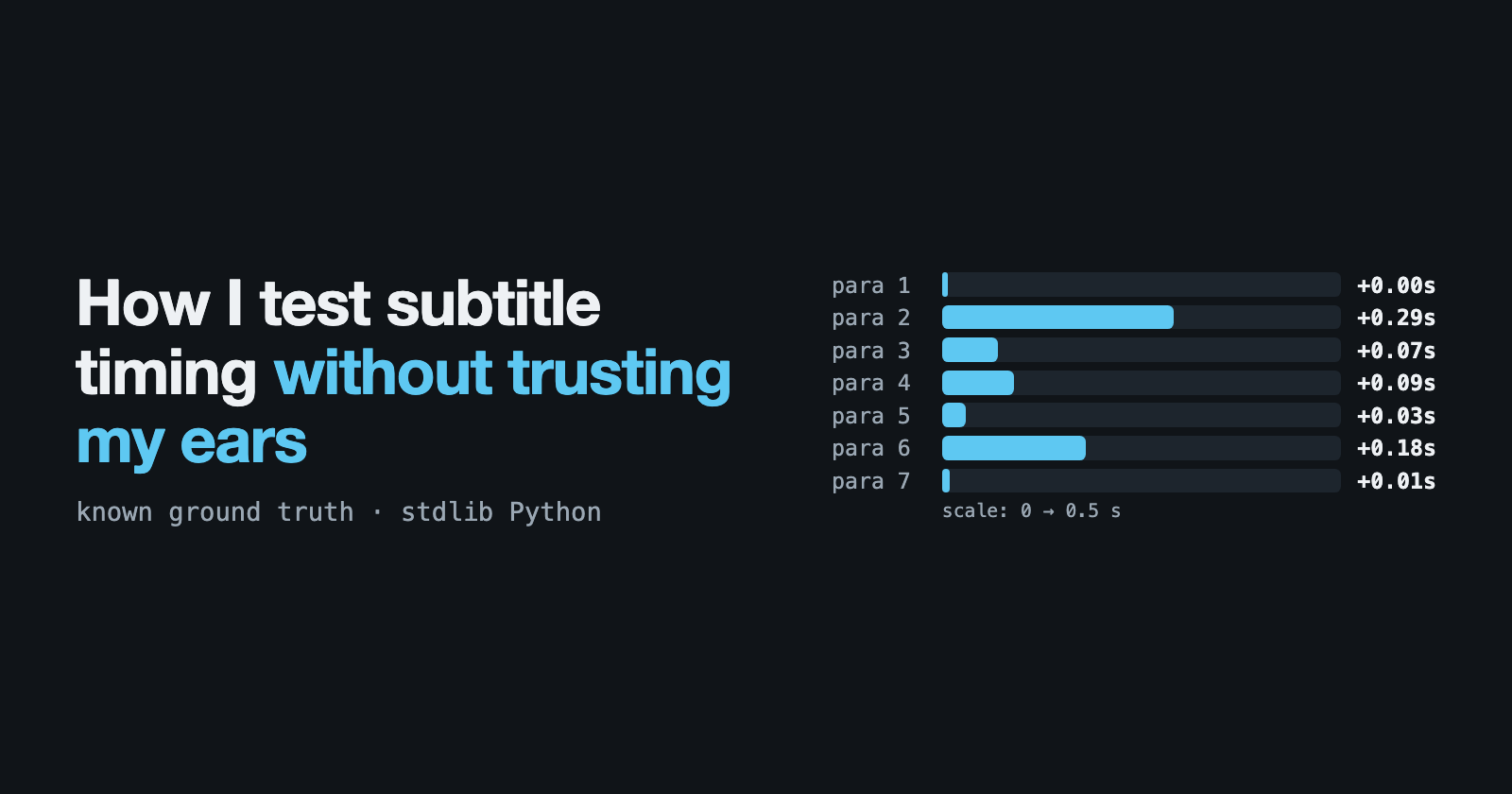
paragraph 1: clip   0.00s  cue   0.00s  diff +0.00s
paragraph 2: clip  12.45s  cue  12.73s  diff +0.29s
paragraph 3: clip  20.50s  cue  20.57s  diff +0.07s
paragraph 4: clip  28.05s  cue  28.14s  diff +0.09s
paragraph 5: clip  39.15s  cue  39.18s  diff +0.03s
paragraph 6: clip  48.05s  cue  48.23s  diff +0.18s
paragraph 7: clip  54.90s  cue  54.91s  diff +0.01s
largest difference: 0.29s
None of the seven opening cues starts before its clip. But a clip start is not the moment speech begins: a TTS clip can open with a short silence. From this table alone, you cannot tell how much of paragraph 2's 0.29 seconds is silence and how much is the aligner. That needs a second pass.
Step 4: Cross-check against detected silence ends
ffmpeg's silencedetect filter prints where each stretch of silence ends, which is a rough proxy for where speech resumes:
ffmpeg -hide_banner -nostats -i voiceover.mp3 \
  -af silencedetect=noise=-40dB:d=0.15 -f null - 2>&1 | grep silence_end
Take the silence_end just after each 0.6-second gap and compare it with the cue start:
| Paragraph | Clip start | Detected silence end | Cue start | Cue − silence end |
|---|---|---|---|---|
| 2 | 12.45 | 12.686 | 12.735 | +0.049 |
| 3 | 20.50 | 20.523 | 20.575 | +0.052 |
| 4 | 28.05 | 28.069 | 28.140 | +0.071 |
| 5 | 39.15 | 39.186 | 39.180 | −0.006 |
| 6 | 48.05 | 48.175 | 48.225 | +0.050 |
| 7 | 54.90 | 54.944 | 54.910 | −0.034 |
(Paragraph 1 starts at 0, and the detector found no silence of 0.15 s or more before it.)
Relative to these detected silence ends, the six cue starts land between −0.034 and +0.071 seconds. Taking the recorded clip boundary as given, paragraph 2 stays below the threshold for about 0.236 seconds after its clip starts, which leaves about 0.049 seconds between the end of that silence and the cue. In other words, about 0.236 of the 0.285-second clip-to-cue offset falls inside the detected below-threshold stretch. That does not pin down the first word's onset or isolate the aligner's error, but it makes the 0.29 seconds in Step 3 look much less alarming.
Treat this as a cross-check, not a second ground truth. The −40 dB threshold and 0.15-second minimum are my choices; change them and the numbers move. It does not establish exactly when the first word begins; that would need hand-annotated onsets.
Turning it into a regression check
Once the score is a number, you can fail a build on it. A few lessons from writing that check:
- Do not use
assert.python -Ostrips asserts. Exit with an explicit error instead. - Require every anchor to match exactly once. A missing or duplicate match should fail loudly, not be skipped.
- Compare each anchor with a recorded baseline, not just the worst value. If six anchors drift and the worst one does not change, a max-only threshold will not notice.
In the Step 3 script, insert diffs = {} right before the paragraph loop (no indentation). Inside the loop, insert diffs[p["paragraph"]] = diff right after the diff = ... line, with the same four-space indentation. Then append this after the loop, with no indentation:
TOLERANCE = 0.10  # seconds of drift allowed per anchor versus the baseline run
baseline = {1: 0.000, 2: 0.285, 3: 0.075, 4: 0.090, 5: 0.030, 6: 0.175, 7: 0.010}

if set(diffs) != set(baseline):
    raise SystemExit("anchor IDs differ from baseline")
drifted = {n: round(d, 3) for n, d in diffs.items() if abs(d - baseline[n]) > TOLERANCE}
if drifted:
    raise SystemExit(f"timing drifted from baseline: {drifted}")
The tolerance is a judgment call for your use case, not a standard.
What this test cannot tell you
- It is seven anchors on one synthetic recording. That is a smoke test, not an accuracy benchmark. Real voices, crosstalk and music are a different problem, and this fixture says nothing about them.
- It checks paragraph starts only. Timing inside a paragraph, cue end times, missing or extra cues, ordering and readability all need their own checks.
- Readability is separate. Cue 2 above holds one complete sentence and lasts 8.44 seconds. A paragraph-anchor check says nothing about its start time or whether it is readable.
- Prefix matching is fragile. It matches the first 20 characters, case-sensitive. A tool that merges paragraphs, splits an opening across two cues or changes punctuation will break the match even when its timing is good. Building more anchors from per-sentence clips helps, but it also changes the recording you are testing.
Try it on your own output
The original files are available under CC BY 4.0: the script, the MP3, the SRT, the recorded clip starts and the original scoring script. They were made as a demo for my own product, so the script text mentions it; the test does not depend on that. The original run is written up on the TimedSubs blog.
Swap in an SRT from another tool and run both passes. If you build a harder fixture, with real voices, overlaps or music under the speech, I would like to see how it scores. How do you test subtitle or caption timing today?
Comments
Join the discussionNo comments yet. Be the first to comment.